DDSL, a Godot plugin for scripting dialogues
A downloadable Godot addon
DDSL is a dialog manager plugin for Godot 4.6+, using a scripting language integrated with the GDScript system for dialogs
The plugin is primarily published on the Godot Asset Store and its sourcecode is available on Github
Features
- Integration with GDScript, including native calls to built-in methods
- Operator overloading possible within the DSL
- Unboundedly nested branching options without forced use of `goto` statements
- Programmer-first dialog writing
- Simple custom UI interface
Basic usage
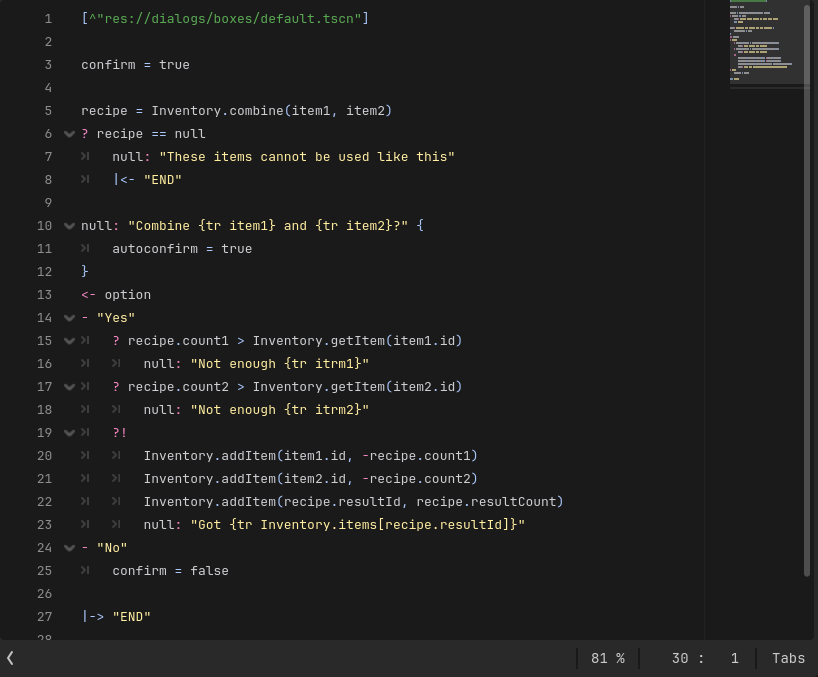
Dialog scripts can be created anywhere within the game's project folder. For this, create a text file, and end it with `.ddsl`, then fill it with the dialog, for example
edwin = ^"res://sprites/portraits/edwin.png"
edwin: "Hello, little rover. Are you lost?" { autoconfirm = true }
<- option
- "Yes"
    edwin: "Oh, well, we can't have that here. Come, follow me"
    Cutscenes.trigger("edwinTavernWalk")
- "No"
    edwin: "Are you sure? Well, then... Hope this helps you in your journey"
    Inventory.add("potion/health2")
    edwin: "If you need me, you can find me in my tavern"
- "Kill all humans" ? Inventory.has("weapon/knife") # this branch is not created unless the player has a knife
    edwin: "Why, why, so aggressive! And here I thought you were a friendly little roomba!"
    edwin: "I say, you shouldn't have this"
    Inventory.remove("weapon/knife")
    edwin: "Are you even old enough to have a knife? When were you born?"
    age <- number(1980, 10000)
    ? Time.get_time_dict_from_system()["year"] < age
        edwin: "A time traveller too? I find it hard to believe."
    edwin: "I think you should come with me"
    Cutscenes.trigger("edwinTavernWalk")
Information about the domain-specific language can be found on the Github Wiki
Once a dialog file is created, it can be executed in-game in two primary ways
# Note that there is no default dialog box provided so Dialog will error during execution if one is not explicitly set
Dialog.setBox(someDialogBoxScene)
# The main way the dialogs can interact with GDScript is via explicit object bindings
# Global bindings are permanent between all dialog calls
Dialog.bindGlobal(InventoryManager, "Inventory")
# This will start the dialog without blocking current execution, executing _dialog_callback after the dialog finishes
Dialog.start("res://path/to/dialog.ddsl", _dialog_callback)
# Current execution will be paused for the duration of the dialog
# `value` will be assigned to a dictionary containing all variables created during script execution
var vars = await Dialog.start("res://path/to/dialog.ddsl")
Full usage instructions can be found in the Github Wiki
Documentation
The documentation for the plugin is hosted on the Github Wiki of the repository
Download
Install instructions
Preferably, use the Godot Asset Store to acquire the latest version of the plugin. Alternatively, follow the steps:
- Download the latest release of the addon
- Copy the folder `addons/ddsl` from the downloaded archive into your Godot project's `addons/` folder
- Go to `Project > Project Settings` tab `Plugins` in the Godot editor
- Enable the DDSL plugin
- The `Dialog` singleton should be now accessible in the code and `dialog_*` input map actions should be added
- If this is not the case, reload the project
- Add appropriate controls to the `dialog_*` actions in `Project > Project settings` under the `Input map` tab
Full installation guide can be found on the Github Wiki
Development log
- DDSL 1.2.111 hours ago
Leave a comment
Log in with itch.io to leave a comment.